Data Entry

Customer Relationship Management (CRM) Database – Microsoft Excel
This project showcases my ability to organise and manage customer information using Microsoft Excel. The database includes customer contact details, mailing addresses, birthdays, customer tags, and interaction notes in a structured format. I used Excel's sorting, filtering, and data management features to keep records organised, accurate, and easy to retrieve. To protect client privacy, all confidential information was hidden before the screenshot was taken.
Seller Property Information Form – Google Forms
This project demonstrates my ability to create efficient online forms for data collection. I designed a Seller Property Information Form using Google Forms to gather essential information from homeowners before an initial consultation. The form collects contact details, property information, and other relevant data while automatically organising responses, reducing manual data entry, and ensuring consistency.
Blog Post Draft – Google Docs
This sample highlights my document formatting and content organisation skills using Google Docs. The document is a blog draft discussing how Federal Reserve rate cuts may influence mortgage rates in 2025. I used Google Docs to structure the content with headings, subheadings, and properly formatted paragraphs while taking advantage of its collaboration, editing, and automatic saving features.
Team Meeting Presentation – Microsoft PowerPoint
This project demonstrates my ability to create professional business presentations. Using Microsoft PowerPoint, I designed a presentation containing the meeting agenda, project updates, charts, and key discussion points. I applied clean layouts, formatting, and visual elements to present information clearly and effectively for a team meeting.
Expense Tracker – Google Sheets
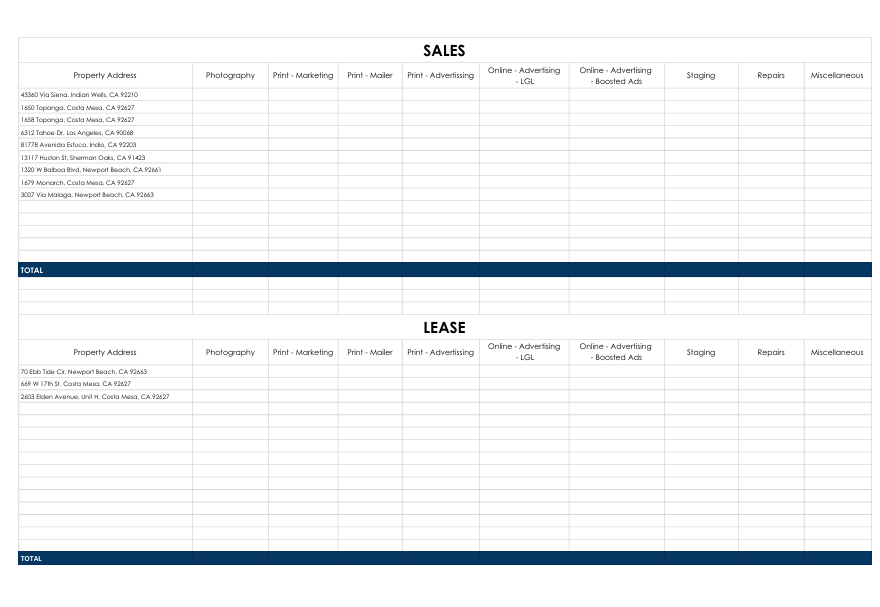
This project is a Property Marketing and Expense Tracker created using Google Sheets to organize and monitor marketing expenses for both sales and lease properties. The spreadsheet contains property addresses and tracks various marketing and operational costs, including photography, print marketing, mailers, online advertising, boosted ads, staging, repairs, and miscellaneous expenses.
I used Google Sheets to create and manage a structured spreadsheet that allows expenses to be recorded, categorized, and easily monitored. The organized layout helps keep property records accurate, simplifies expense tracking, and provides a clear overview of marketing costs for each property. Google Sheets also enables easy collaboration, automatic saving, and real-time updates, making it an efficient tool for managing data across multiple properties.