Google Calendar Management & Executive Scheduling
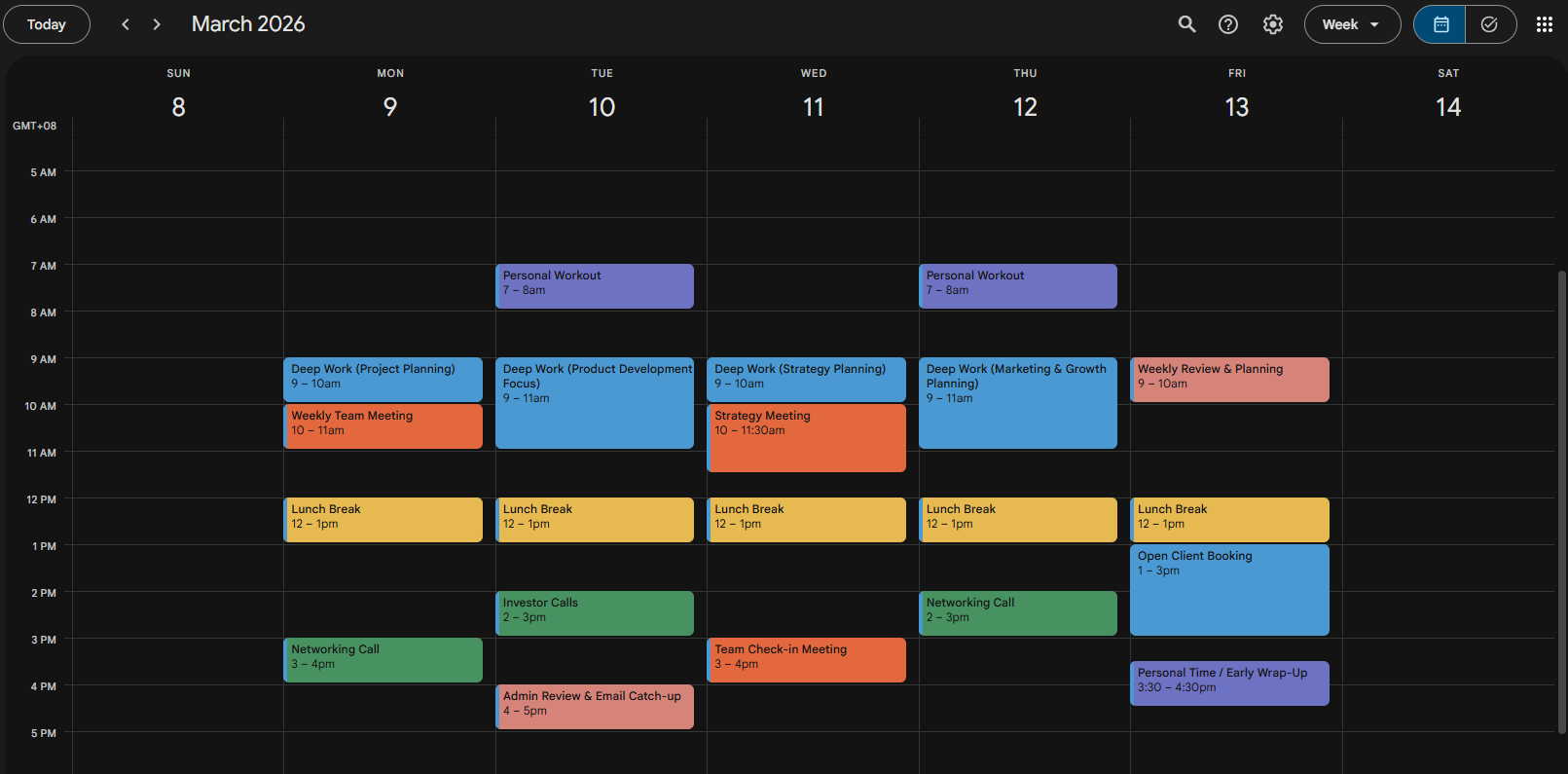
As an Executive Assistant, I designed this sample Google Calendar system to demonstrate how I create structured, productivity-focused scheduling that reduces conflicts and supports seamless daily operations.
This demo shows how I would design a customized calendar system tailored to a client's workflow, priorities, and business goals. My scheduling process focuses on clarity, efficiency, and strategic time management.
Google Calendar Services Include:
-
Full Google Calendar setup & organization
-
Time blocking for focused work sessions
-
Meeting scheduling & coordination
-
Recurring event management
-
Appointment confirmations & reminders
-
Color-coded calendar categorization
-
Buffer time implementation to prevent burnout
-
Time zone management for remote teams
-
Integration with Zoom, Google Meet, and CRM tools
My goal is to create calendar systems that support executive-level productivity while maintaining flexibility and balance. Every schedule I build uses a proactive approach, minimizing last-minute conflicts and maximizing efficiency.
This sample demonstrates how clients would stay organized, on time, and focused on high-priority tasks without worrying about daily scheduling logistics.