Mortgage List
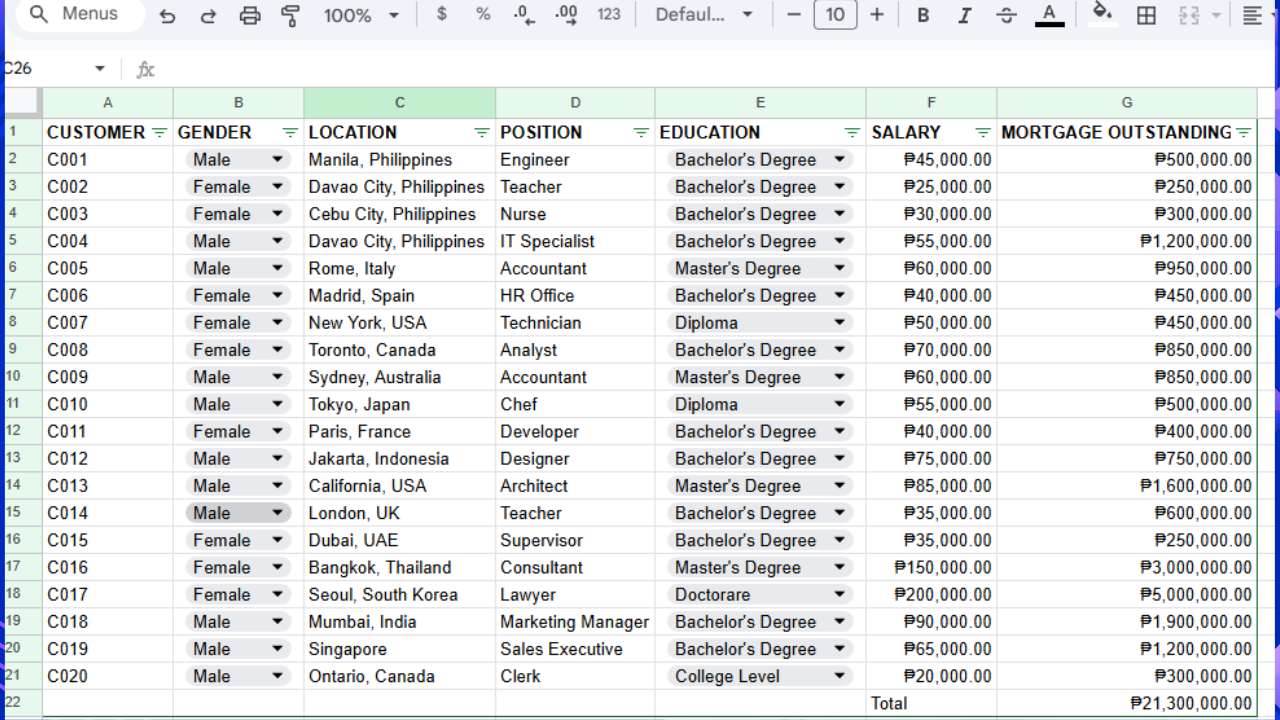
I created a mortgage list in Google Sheets to organize and manage customer mortgage information in a single spreadsheet. I used additional Google Sheets features such as sorting, filtering or data validation.
Each row represents one customer, while each column stores a specific type of information. For example, the Customer Number uniquely identifies each customer, Location records where the customer lives, Position indicates their job title, Education records their highest educational qualification, Salary shows their income, and Mortgage Outstanding displays the remaining balance on their mortgage.
To make the spreadsheet easier to read, I formatted the header row in bold, adjusted the column widths, and applied currency formatting to the Salary and Mortgage Outstanding columns. I also used the SUM function to calculate the total mortgage outstanding at the bottom of the Mortgage Outstanding column.