Data Entry
Customer DataBase 2026 (Mock) - Google Sheets docs.google.com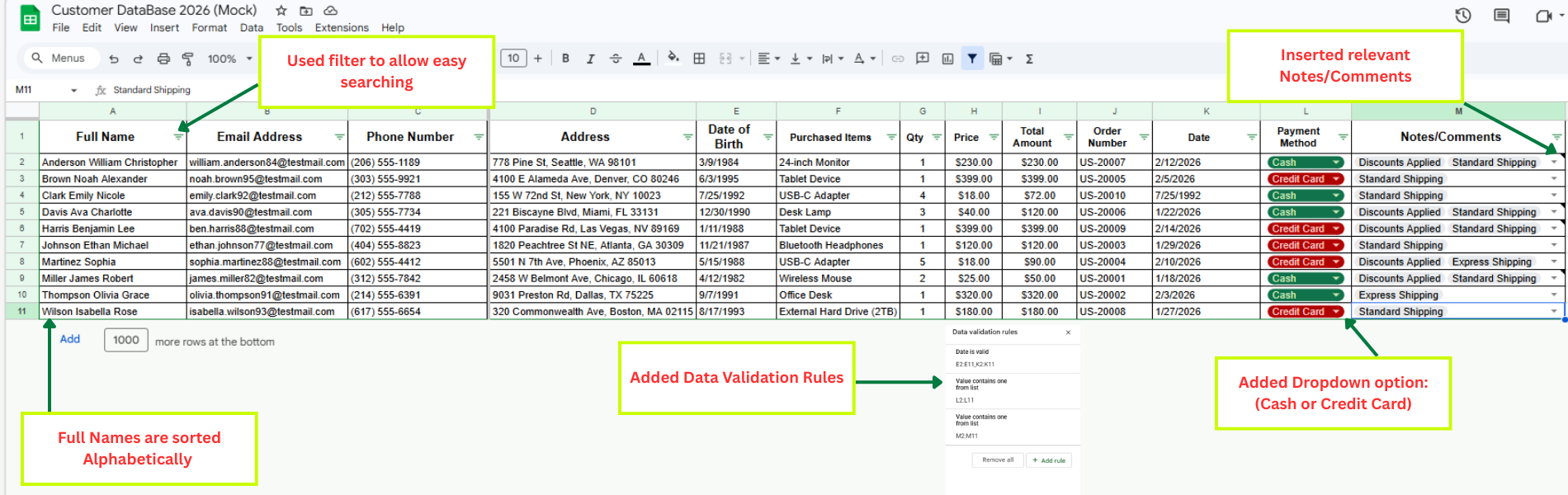
Objective: Create a customer database using Google Sheets. This database will help the company manage customer information effectively.
Instructions:
1. Data Collection:
Collect only dummy information and ensure that each customer record includes complete details such as Full Name, Email Address, Phone Number, Address, Date of Birth, detailed Purchase History (including date of purchase, items purchased, quantity, price, total amount, order number, and payment method whether credit card or cash), and any relevant Notes or Comments such as discounts applied, special requests, or delivery details.
2. Data Entry:
Open Google Sheets and create a new spreadsheet, then set up columns labeled Full Name, Email Address, Phone Number, Address, Date of Birth, Purchase History, and Notes/Comments; once the columns are prepared, input the collected data accurately into their corresponding fields to ensure proper organization and easy reference.
3. Formatting:
Format the spreadsheet to improve readability by applying bold headings, adjusting column widths as needed, and enabling text wrapping where necessary. Use data validation settings to ensure entries follow the correct formats, such as proper date and phone number structures.
4. Data Organization:
Sort the data alphabetically by Full Name.
Use filters to allow easy searching and filtering of the data.